Welcome to CCNA Lab by jodoi
 Lab every Clause use program Cisco Packet Tracer v5.3 b.
Aims to increase knowledge and experience only.
Any Lab design of practical work experience to meet. The objective is to share or share them with CCNA course with Joe Hill or working in the IT and Network General. Informed of the issues that arise from the work will focus on the Troubleshooting and performance practice as often as I said that. The saying "hundred Chat Krishnakan.
Send answers from tests made Lab problems or doubts in it. Or share the experience. sale@jodoi.com.
Encouraged me to work at it.^^"
Team JODOI
Overview
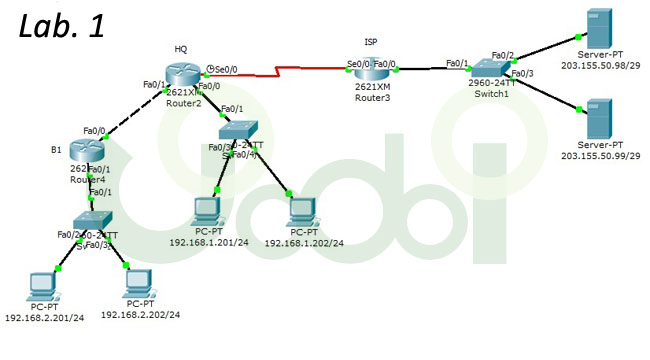
Engineer Administrator Network HQ and B1 to Config Router Cisco HQ but did not complete the Admin user the PC and Server every consecutive terms is to have a Router HQ and Switch Cisco side B1 only password and IP of the router HQ find ourselves. them.
 Lab
Lab
Answer
 main page
Overview
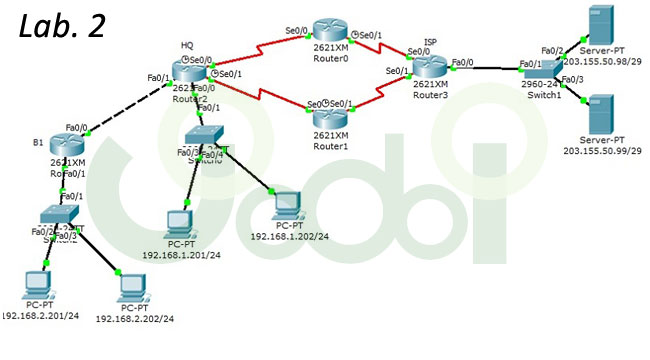
Give Admin Moderators makes PC and Server every machine consecutive have by using Routing eigrp values AS Number 100 by prohibiting tamper with Static route existing original he Router Cisco have every built-with passworg jodoi. Lab
Answer
main page
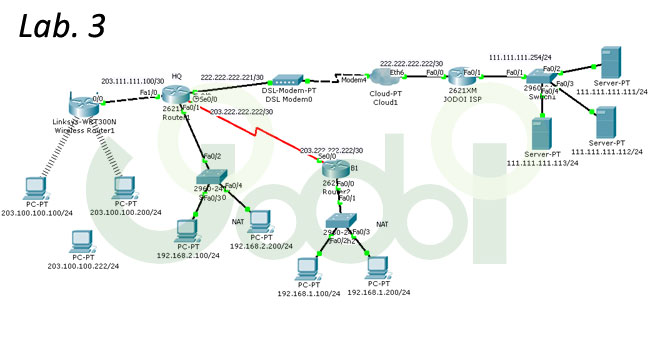
Overview
The Admin user interface makes every PC Server config by checking the route, Nat and wan ppp chap Router Cisco Access anywhere with passworg jodoi.
Lab
Answer
main page
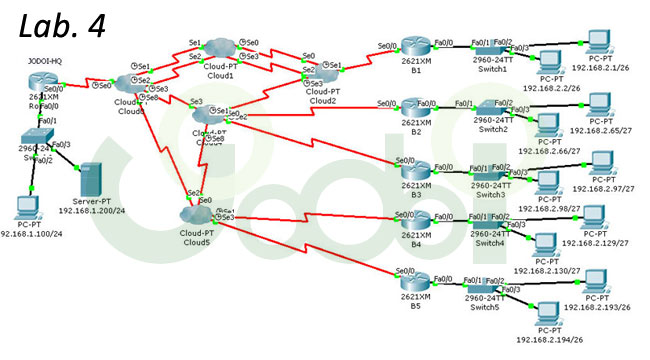
Overview
Admin Administrator to make the PC every touch every field are using the encapsulation frame-relay ietf, lmi-type ansi. Lab
Answer
main page
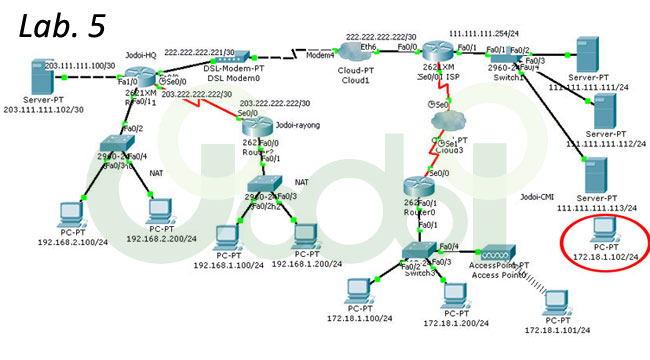
Overview
Engineer of Jodoi IT Network Administrator to make the question the wrong config ACL on Router HQ to edit the config.
1. Acl 101 Server IP 111.111.111.111 not open web 203.111.111.102. Only remaining all allowed.
2. Acl 100 PC IP 192.168.2.200 I can open the web every website but only web web 203.111.111.102 single PC IP 192.168.2.0/24 can not open other web 203.111.111.102 with other conditions. Can work normally.
Edited by Lab via wireless remote register. To realism.
Admin Config to allow administrators to perform PC 172.18.1.102 only and is password for telne. jodoi
Lab
Answer
main page
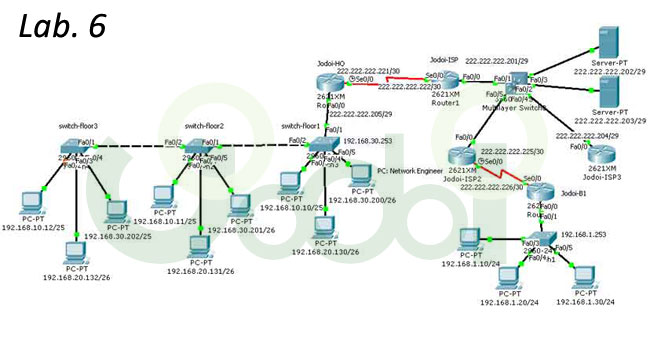
Overview
Admin user to make PC-to-machine interface with IP Public Internet has made it through FIX PC: Network Engineer only telnet to router and switch with password: jodoi.
Notes can switch-floor2, switch-floor3 and PC computers directly. That remained to do passed the telnet purposes only so the realism.
Lab
Answer
main page
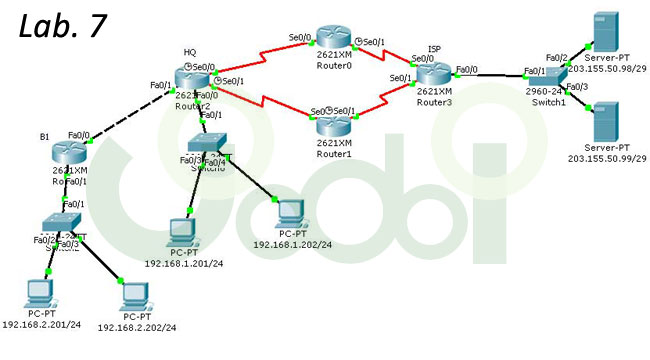
Overview
The administrator uses the Admin knowledge of NAT and Routing OSPF using the process id = 20 area = 0 condition is contagious to all the router and the ISP Server PC can be.
Lab
Answer
main page
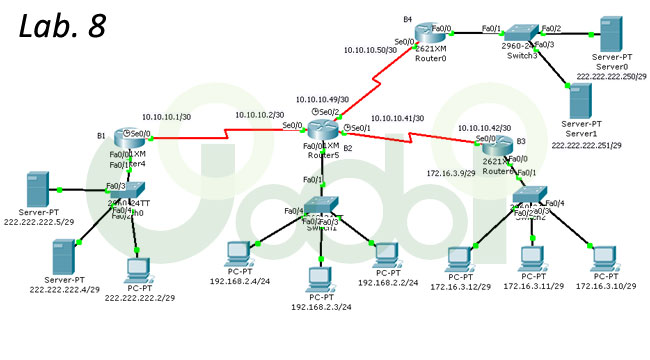
Overview
Admin and Moderators of this Lab is to provide a common interface to the router every rip version 2.
1. PC and Server be able to ping each other.
Two. Allow only one PC 192.168.2.4 can only access web 222.222.222.251 has banned all other hosts to do ACL 3 line. And do the same router and the same Interface.
Lab
Answer
main page
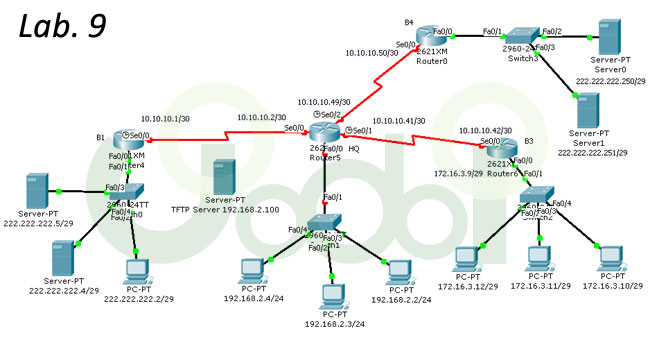
Overview
Lab 8 is due to be opened up to the lab to close an opening Router (HQ) will not boot up, to load IOS name file c2600-i-mz.122-28.bin with the TFTP Server IP 192.168.2.100. If not, then boot to load config file jodoi-confg from the TFTP Server name if done right, every pc is contagious.
Note how, in an article by Jodoi.
ได้ค่ะ
Lab
Answer
main page
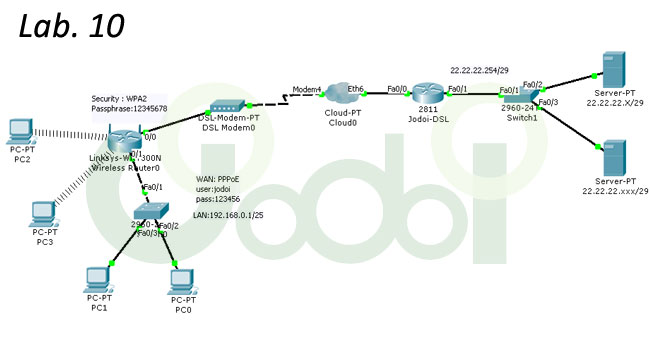
Overview
Lab Article 10 is a Basic Network learners CCNA also do not need a PC, left hand all of Contact Server the right hand side has a set IP on the Server and the PC is not DHCP and Router Linksys to set WAN as PPPoE using. user: jodoi and pass: 123456 wireless portion of the set Security: WPA2, Passphrase: 12345678 and IP LAN: 192.168.0.1/25 Server the right hand side of the IP 22.22.22.254/29
Lab
Answer
main page
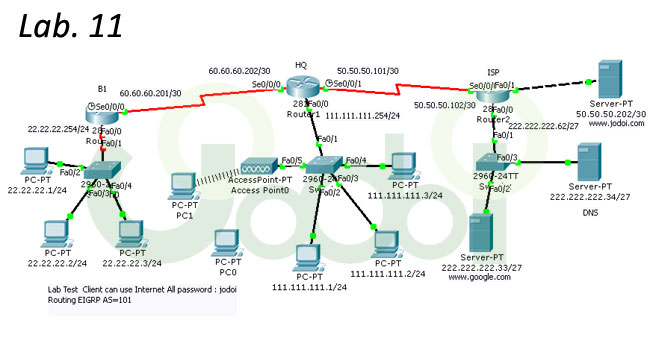
Overview
Lab Test 11 Client can use Internet ( can ping www.jodoi.com and www.google.com )
All password : jodoi
Routing EIGRP AS=101,WAN PPP CHAP
Lab
Answer
main page
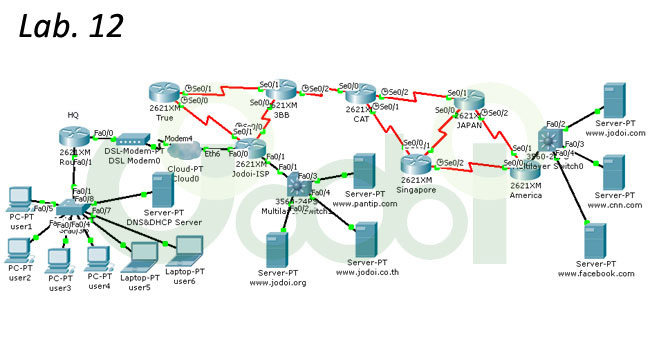 Overview
LLab Clause 12 enables the Client to the Internet and open to every website.
password in the router, all the knowledge is jodoi WAN, NAT, ACL and
Routing OSPF using the process id = 1, area = 0.
Lab
Answer
main page
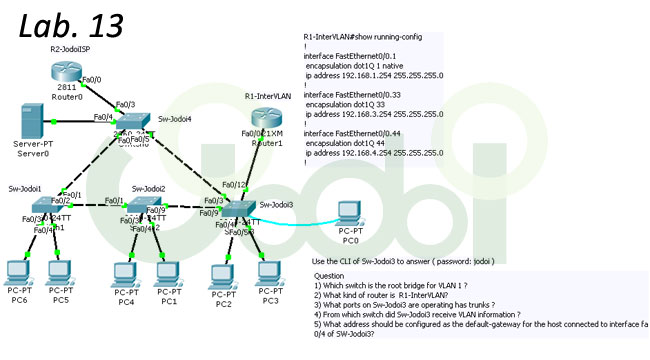 Overview
Details of lab files.
Lab
Answer
Overview
Lab Article 14 makes the pc is connected to Router HQ Server can reverse any and all Application.
By the following conditions.
Router HQ Nat made to Client.
Routing ospf process-id=2
area = 0
All Client can ping to all Server
All password=jodoi
main page
<>
Details of lab files. Overview Lab 15 All PC can open website www.jodoi.com and www.jodoi.org Details of lab files. Overview Lab ข้อ 16 Details of lab files. Overview Lab 17 Details of lab files. Overview Lab ข้อ 18 Check config NAT,ACL,DHCP,Routing by Telnet from 192.168.1.253 Details of lab files. Overview Lab 19 Details of lab files. Overview Lab 20 Details of lab files. Lab ข้อ21 Details of lab files. Lab 23 Jodoi Lab.23 ALL PC can connect www.jodoi.com and www.jodoi.org 1-Click on ADSL Router and go to the gui tab. In the Basic Setup tab, Internet connection All Password : jodoi Details of lab files. Good luck in the lab here.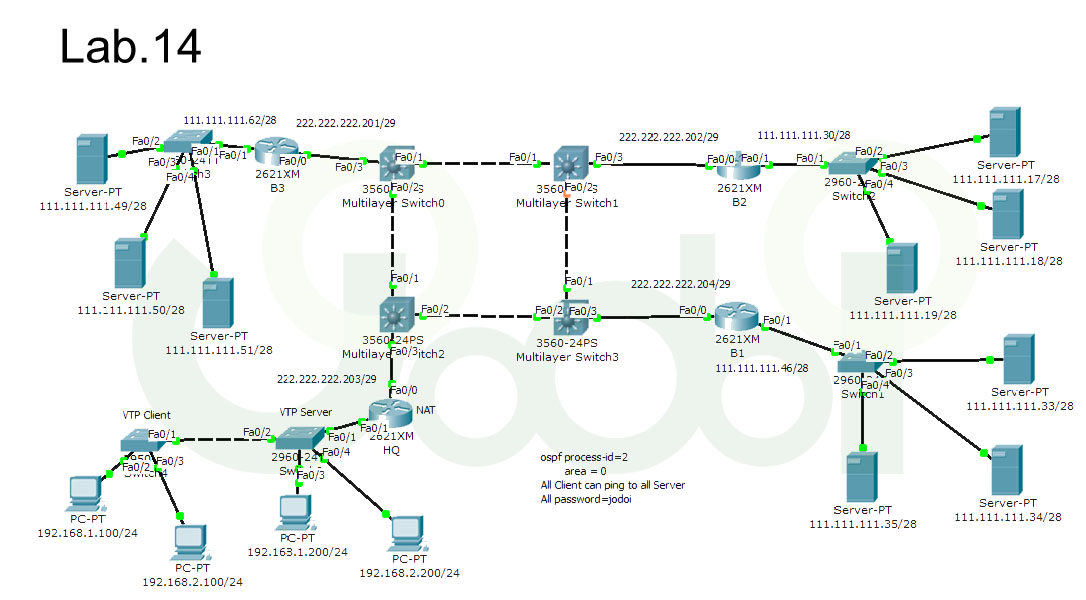 Lab
Lab
Answer
All password on Router-----> jodoi
(WAN,Routing and NAT) 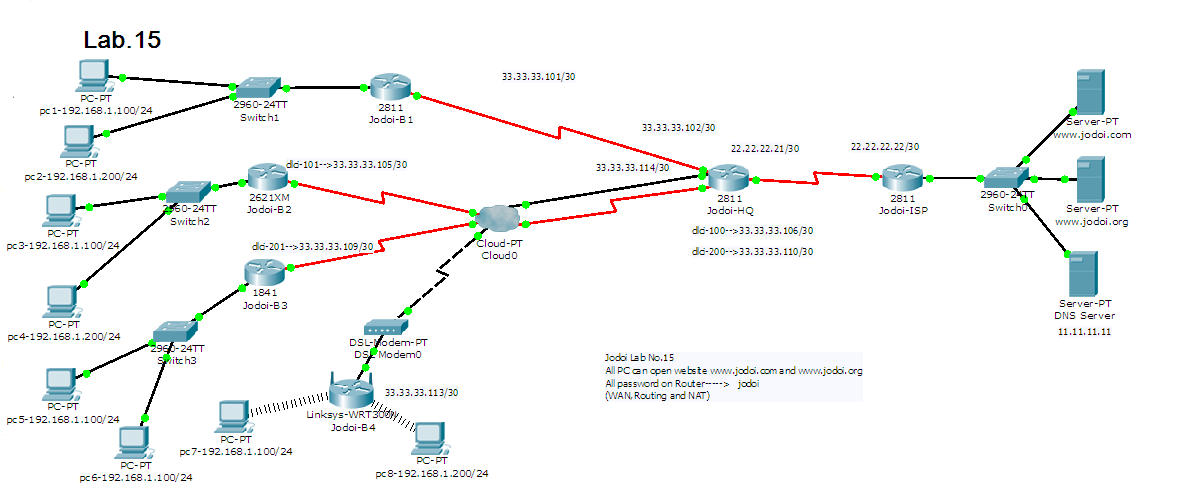
Lab
Answer 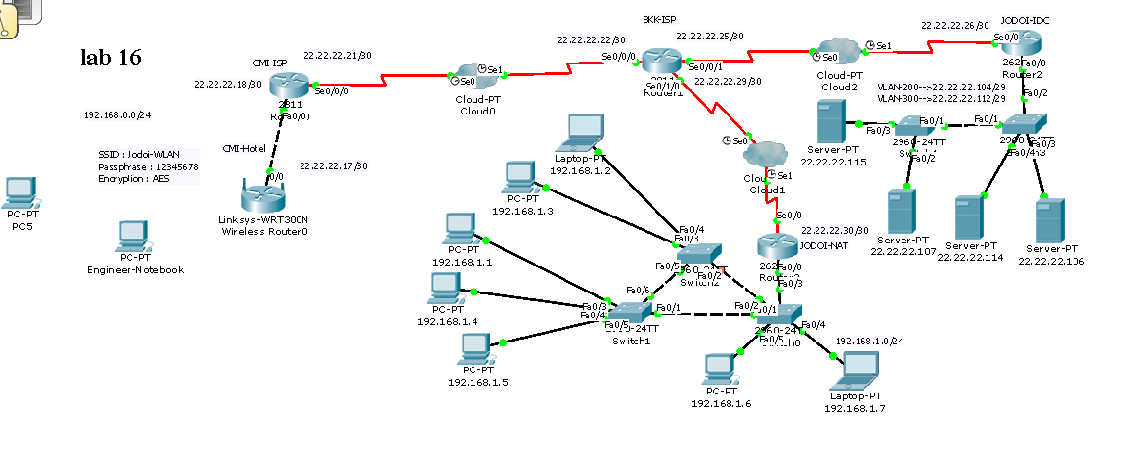 Lab
Lab
Answer (ไม่เฉลย รบกวนส่งLab เข้ามาที่sale@jodoi.com)
Check NAT and Routing EIGRP ( AS=100)
All Password : jodoi
ALL PC can use web server.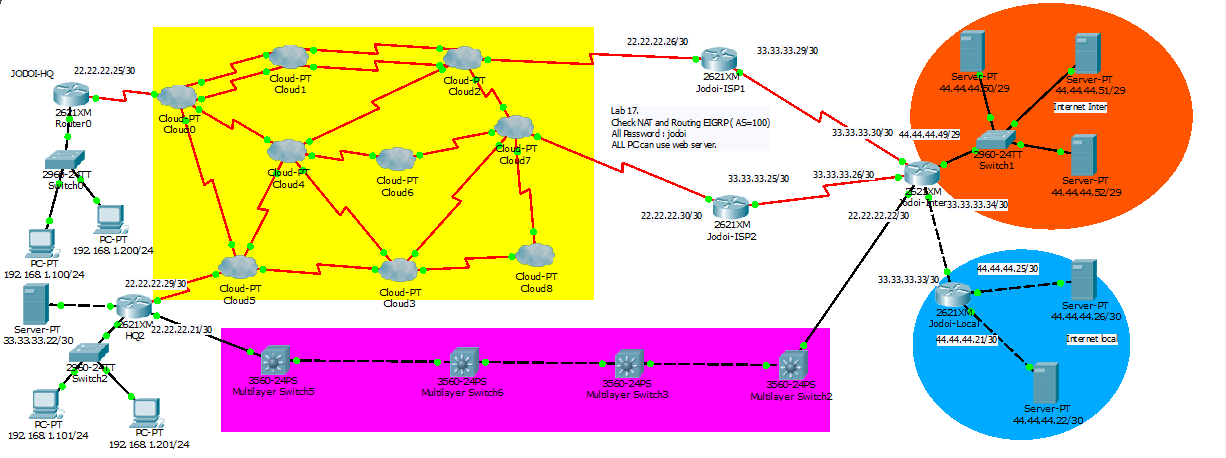 Lab
Lab
Answer (ไม่เฉลย รบกวนส่งLab เข้ามาที่sale@jodoi.com)
(Username:jodoi, Password:jodoi , enable:jodoi )
www.facebook.com 66.66.66.3
www.google.com 66.66.66.5
www.jodoi.com 66.66.66.4
www.mthai.com 203.149.6.3
www.pantip.com 203.149.6.4
www.sanook.com 203.149.6.5
1)All hosts on Jodoi-HQ-NAT can use all application
2)Config ACL on Jodoi-B1-NAT
2.1) hosts on Jodoi-B1-NAT can open all website
except www.facebook.com and www.sanook.com
2.2) hosts on Jodoi-B1-NAT can Telnet to only IP 203.149.5.14 other IP deny
2.3) Other Service deny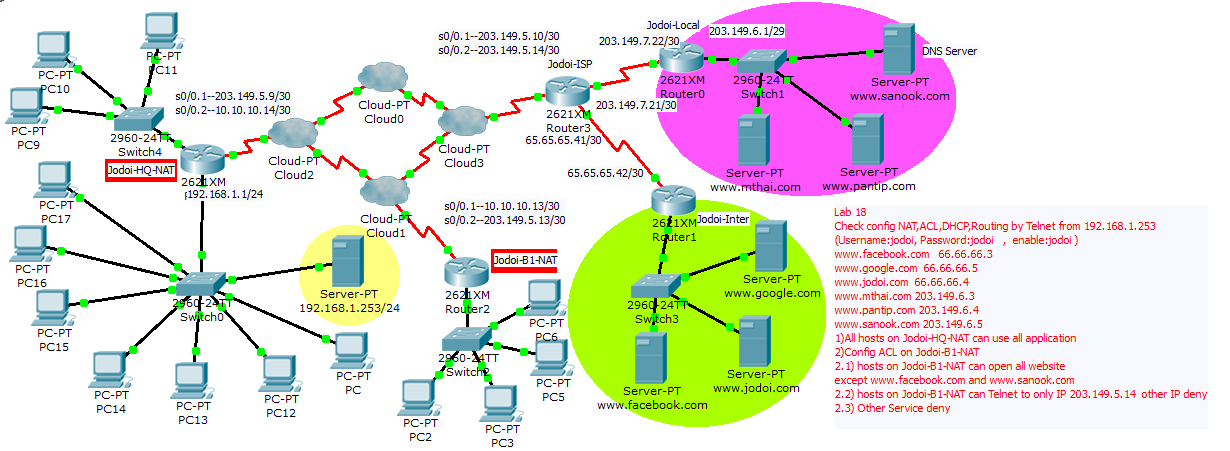 Lab
Lab
Answer (Do not answer I sent to the Lab sale@jodoi.com).Check Config on Jodoi-ADSL,Jodoi-HQ,SW-Floor1,
SW-Floor2,SW-Floor3 .
VLAN 30 --192.168.0.0/24
VLAN 40 -- 192.168.1.0/25
VLAN 50 -- 192.168.1.128/25
Password console and enable : jodoi
All Hosts can use website. All hosts receive IP from router.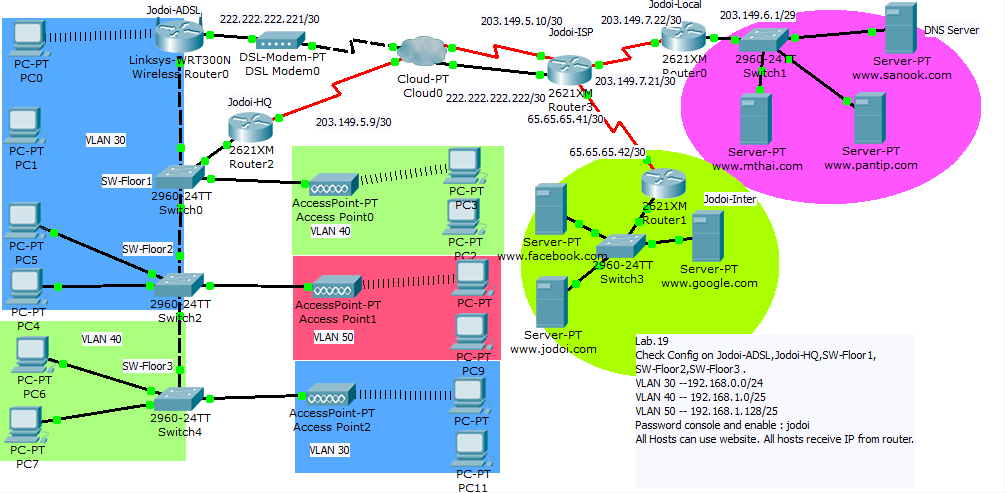 Lab
Lab
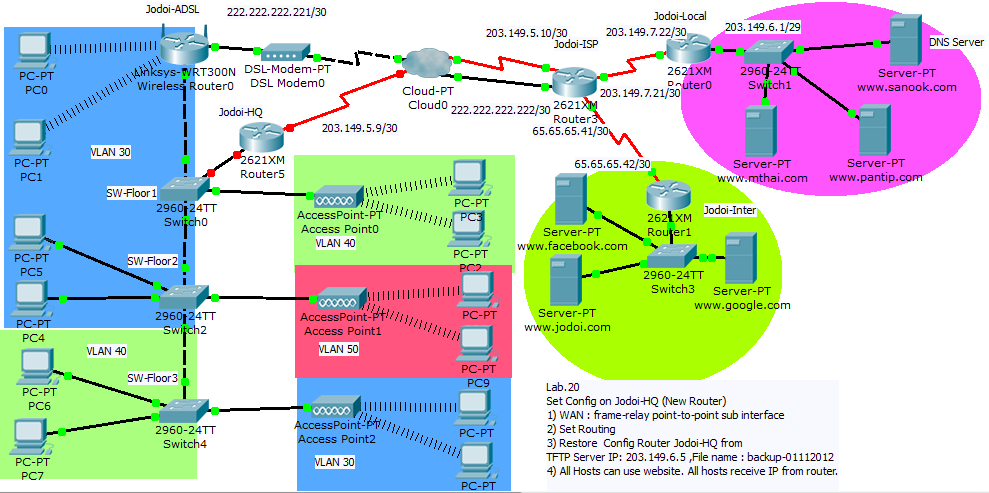
Answer (Do not answer I sent to the Lab sale@jodoi.com).Set Config on Jodoi-HQ (New Router)
1) WAN : frame-relay point-to-point sub interface
2) Set Routing
3) Restore Config Router Jodoi-HQ from
TFTP Server IP: 203.149.6.5 ,File name : backup-01112012
4) All Hosts can use website. All hosts receive IP from router. Lab
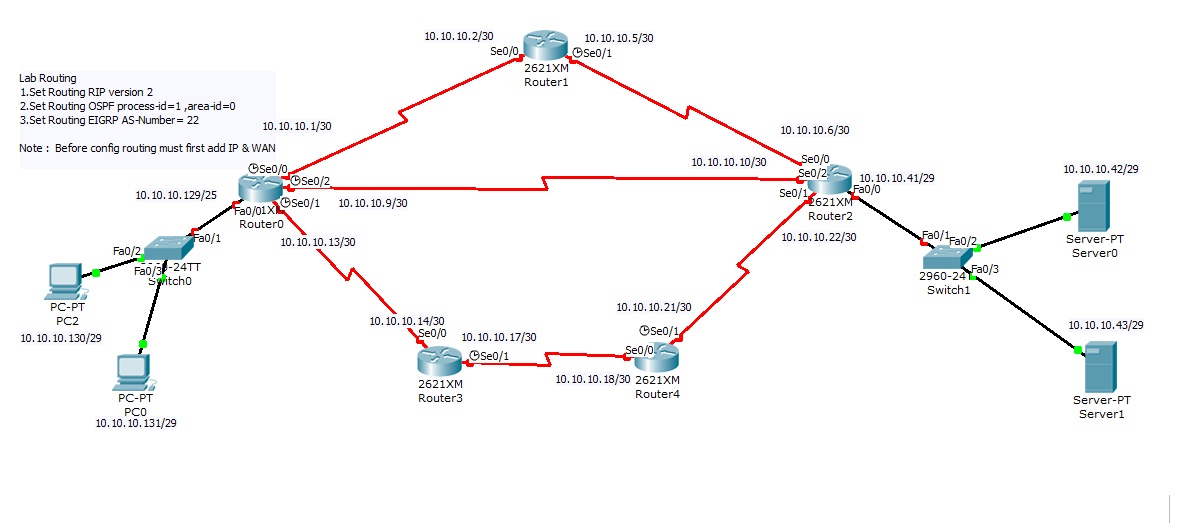
Answer (Do not answer I sent to the Lab sale@jodoi.com).Lab Routing
1) Set Routing RIP version 2
2) Set Routing OSPF process-id=1 ,area-id=0
3) Set Routing EIGRP AS-Number= 22 3.1 ) Use command show ip eigrp topology and show ip route on Router R1
3.2 ) Router R1 change bandwidth interface s0/2 to 1024 kilobits Use command show ip eigrp topology and show ip route on Router R1 again
3.3 )Router R1 add config variance 2 on eigrp 22
( R1(config)#router eigrp 22
R1(config-router)#variance 2 )
Use command show ip eigrp topology and show ip route on Router R1 againNote : Before config routing must first add IP & WAN
 Details of lab files. Lab
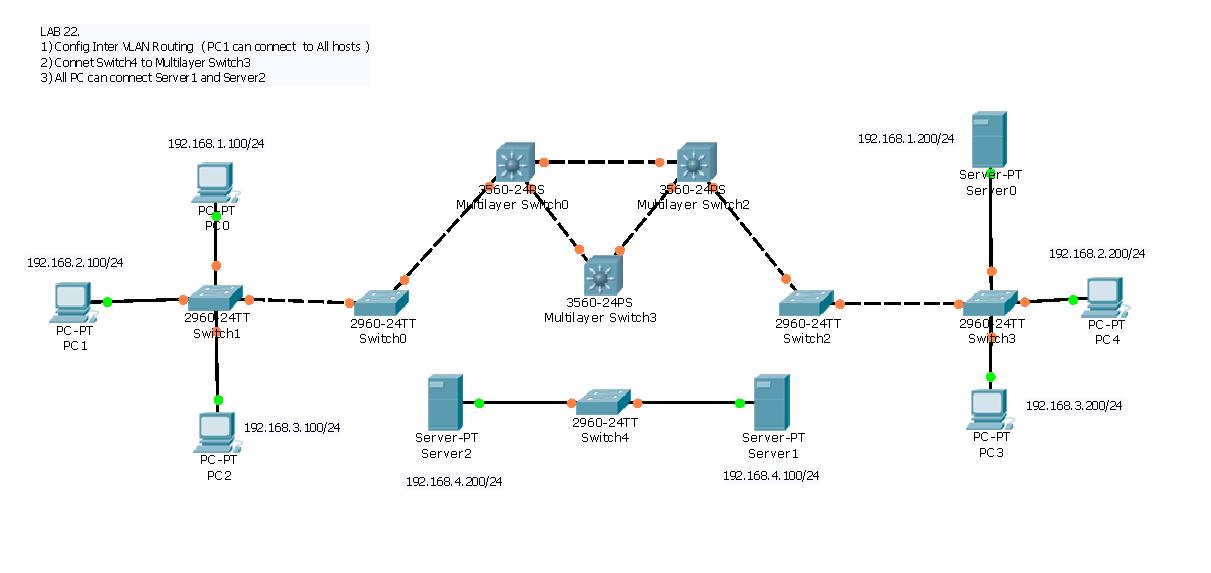
Answer (Do not answer I sent to the Lab sale@jodoi.com).Lab 22
1) Config Inter VLAN Routing ( PC1 can connect to All hosts )
2) Connet Switch4 to Multilayer Switch3
3) All PC can connect Server1 and Server2 Lab
Answer (Do not answer I sent to the Lab sale@jodoi.com).
is set to PPPoE and username = "jodoi" and password = "cisco".
2-Check Config on Router Jodoi2 ( NAT ,Routing ,DHCP )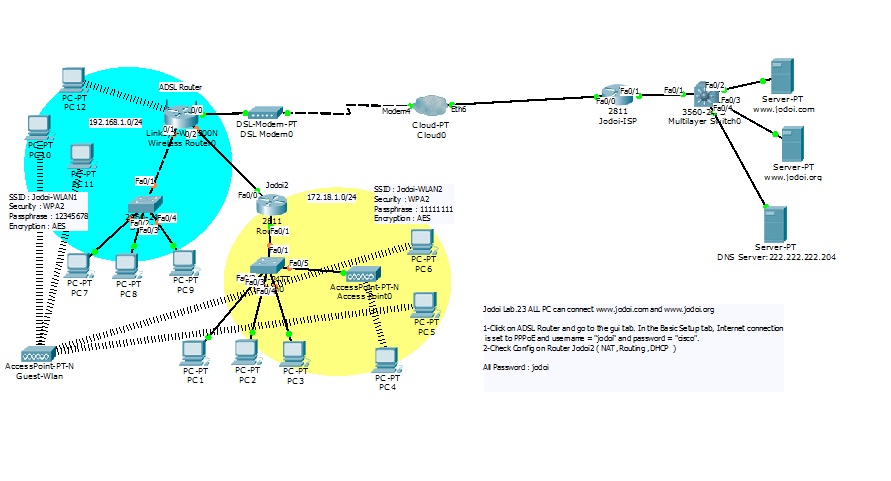 Lab
Lab
Answer (Do not answer I sent to the Lab sale@jodoi.com).
Send answers to sale@jodoi.com , jodoi@jodoi.com